
Use previous example, the command in Maxima
plot2d(lambda([x],G(x)),[x,0,1], [gnuplot_term, latex]);
will produce a picture of G(t1) in tex format. You can find the file entitled maxplot.latex in your home directory and just put it into your LaTeX document.
2007年11月29日 星期四
Use Maxima/gnuplot to export LaTeX code

2007年11月20日 星期二
Maxima example
今天收到了一封Email,寄來問一篇刊登在Omega中論文的程式,順便用Maxima寫了跟Mathematica相同的程式,其中romberg是Maxima裡數值積分的函數。若你想寫程式的話,TeXmacs裡寫程式比較不方便,用wxMaxima會比較好些。


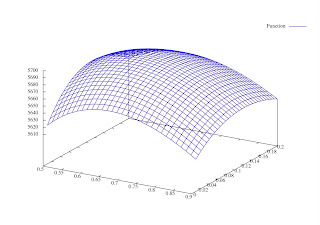 assume(t1>0,t2>0,delta>0);
I1(t):=d(p)*%e^(-g(t))*romberg(%e^(g(u)),u,t,t1);
hc(t1,t2):=h*romberg(I1(t),t,0,t1) ;
I2(t):=-d(p)/delta*(log(1+delta*t2)-log(1+delta*(t1+t2-t)));
sc(t1,t2):=s*-1*romberg((-d(p)/delta*(log(1+delta*t2)-log(1+delta*(t1+t2-t)))),t,t1,t1+t2);
lc(t1,t2):=r*(d(p)*t2+I2(t1+t2));
pc(t1,t2):=c*(I1(0)-I2(t1+t2));
tr(t1,t2):=p*d(p)*(t1+romberg(1/(1+delta*(t1+t2-t)),t,t1,t1+t2));
tc(t1,t2):=k+pc(t1,t2)+hc(t1,t2)+sc(t1,t2)+lc(t1,t2);
tp(t1,t2):=(tr(t1,t2)-tc(t1,t2))/(t1+t2);
n1(p):=diff((p-c)*d(p),p)*(delta*t1-log(1+delta*t2))/(delta*(t1+t2))-diff(d(p),p)*(c*romberg(%e^(g(t))-1,t,0,t1)+h*romberg(%e^(-g(t))*romberg(%e^(g(u)),u,t,t1),t,0,t1)+(s+delta*r)/delta^2*(delta*t2-log(1+delta*t2)));
k:250;c:40;h:1.5;s:5;r:5;delta:0.5;d(p):=16*10^7*p^(-3.21);g(t):=0.05*t^2;p:59.1246;
t2(t1):=(c*(%e^g(t1)-1)+h*romberg(exp(g(t1)-g(t)),t,0,t1))/(s+delta*(p-c+r)-delta*(c*(%e^g(t1)-1)+h*romberg(exp(g(t1)-g(t)),t,0,t1)));
G(t1):=-k-c*d(p)*romberg(%e^(g(t))-1,t,0,t1)-h*d(p)*romberg(%e^(-g(t))*romberg(%e^(g(u)),u,t,t1),t,0,t1)-(d(p)*(s+delta*(p-c+r)))/delta^2*((delta*t2(t1)-log(1+delta*t2(t1))-(delta^2*t2(t1)*(t2(t1)+t1))/(1+delta*(t2(t1)))));
t1:find_root(lambda([x],G(x))=0,x,0,1);
block([], remvalue(p),
p:find_root(diff((p-c)*d(p),p)=0,p,50,100),
do(
ptemp:p,
t1:find_root(lambda([x],G(x))=0,x,0,1),
t2:t2(t1),
remvalue(p),
t1temp:t1,
t2temp:t2,
p:find_root(n1(p)=0,p,50,60),
remvalue(t1,t2),
display(p,t1temp,t2temp),
if abs(p-ptemp)<5.0E-6 then return(p)),
plot3d(lambda([x,y],tp(x,y)),[x,0.5,0.9],[y,0.01,0.2])
)$


 assume(t1>0,t2>0,delta>0);
I1(t):=d(p)*%e^(-g(t))*romberg(%e^(g(u)),u,t,t1);
hc(t1,t2):=h*romberg(I1(t),t,0,t1) ;
I2(t):=-d(p)/delta*(log(1+delta*t2)-log(1+delta*(t1+t2-t)));
sc(t1,t2):=s*-1*romberg((-d(p)/delta*(log(1+delta*t2)-log(1+delta*(t1+t2-t)))),t,t1,t1+t2);
lc(t1,t2):=r*(d(p)*t2+I2(t1+t2));
pc(t1,t2):=c*(I1(0)-I2(t1+t2));
tr(t1,t2):=p*d(p)*(t1+romberg(1/(1+delta*(t1+t2-t)),t,t1,t1+t2));
tc(t1,t2):=k+pc(t1,t2)+hc(t1,t2)+sc(t1,t2)+lc(t1,t2);
tp(t1,t2):=(tr(t1,t2)-tc(t1,t2))/(t1+t2);
n1(p):=diff((p-c)*d(p),p)*(delta*t1-log(1+delta*t2))/(delta*(t1+t2))-diff(d(p),p)*(c*romberg(%e^(g(t))-1,t,0,t1)+h*romberg(%e^(-g(t))*romberg(%e^(g(u)),u,t,t1),t,0,t1)+(s+delta*r)/delta^2*(delta*t2-log(1+delta*t2)));
k:250;c:40;h:1.5;s:5;r:5;delta:0.5;d(p):=16*10^7*p^(-3.21);g(t):=0.05*t^2;p:59.1246;
t2(t1):=(c*(%e^g(t1)-1)+h*romberg(exp(g(t1)-g(t)),t,0,t1))/(s+delta*(p-c+r)-delta*(c*(%e^g(t1)-1)+h*romberg(exp(g(t1)-g(t)),t,0,t1)));
G(t1):=-k-c*d(p)*romberg(%e^(g(t))-1,t,0,t1)-h*d(p)*romberg(%e^(-g(t))*romberg(%e^(g(u)),u,t,t1),t,0,t1)-(d(p)*(s+delta*(p-c+r)))/delta^2*((delta*t2(t1)-log(1+delta*t2(t1))-(delta^2*t2(t1)*(t2(t1)+t1))/(1+delta*(t2(t1)))));
t1:find_root(lambda([x],G(x))=0,x,0,1);
block([], remvalue(p),
p:find_root(diff((p-c)*d(p),p)=0,p,50,100),
do(
ptemp:p,
t1:find_root(lambda([x],G(x))=0,x,0,1),
t2:t2(t1),
remvalue(p),
t1temp:t1,
t2temp:t2,
p:find_root(n1(p)=0,p,50,60),
remvalue(t1,t2),
display(p,t1temp,t2temp),
if abs(p-ptemp)<5.0E-6 then return(p)),
plot3d(lambda([x,y],tp(x,y)),[x,0.5,0.9],[y,0.01,0.2])
)$
2007年11月19日 星期一
The derivation of EOQ with Maxima and Texmacs
Maxima是一種用LISP編寫的計算機代數系統 (Computer Algebra System),你可以將他運用於公式推導和符號運算,當然數值分析也是他的強項。如果你之前就使用過Mathematica或Scientific WorkPlace,把他當成這兩個軟體的免費版,那你會很容易上手。更吸引人的是,以TeXmacs作為Maxima為前端,除了數值運算外,還可將排版好的文件輸出為tex或pdf檔,做起講義來會事半功倍。以下是基本經濟訂購量模型的推導:


2007年11月16日 星期五
Running TeXmacs with maxima 5.13.0 under Macbook

Replace 2 scripts in your TeXmacs installation (if you use fink, usually they live in /sw/lib/TeXmacs/bin) by the attached versions. Then, executing the command, open-x11 texmacs, in your terminal. Enjoy
教學相長

我是戴忠淵,目前在某科技大學任教。我的專長是作業研究(Operational Research)。那什麼是作業研究,看看英國作業研究學會的定義
Operational Research ("OR"), also known as Operations Research or Management Science ("OR/MS") looks at an organisation's operations and uses mathematical or computer models, or other analytical approaches, to find better ways of doing them.
只是我常常被誤以為是統計專長,教書八年來,沒有開過作業研究相關課程,也沒收過任何研究生。目前我上的課程名稱是資訊應用。介紹Excel如何操作使用。
2007年11月15日 星期四
Running wxMaxima with Maxima under Macbook

Here is the list of what we are going to install:
maxima, clisp, AquaTerm, gnuplot, wxmac28, wxmaxima
1. Download clisp from http://clisp.sourceforge.net/
./configure ; make;
sudo make install
2. Download maxima from http://maxima.sourceforge.net/
./configure ; make;
sudo make install
The maxima command is installed in /usr/local/bin.
AquaTerm is a Mac OS X grahics renderer. It allows command line applications written in ObjC, C, FORTRAN, Lisp, Perl or Python to display vector graphics, text and images using a simple API. Adapters for gnuplot, PGPLOT, and PLplot exists as well.
3. Download AquaTerm from http://aquaterm.sf.net/
./configure ; make;
sudo make install
4. Download gnuplot from http://www.gnuplot.info/
Now compile gnuplot 4.2 from source.
./configure ; make;
sudo make install
The gnuplot command is installed in /usr/local/bin.
wxMaxima is a cross platform GUI for the computer algebra system maxima based on wxWidgets.
5. Download wxmac28 from http://www.wxwidgets.org/downloads/
./configure ; make;
sudo make install
6. Download wxmaxima from http://wxmaxima.sourceforge.net/
./configure --with-wx-config=/usr/bin/wx-config --with-xml-prefix=/usr --enable-unicode-glyphs --enable-printing --enable-dnd --disable-dependency-tracking
make wxMaxima.app
mv wxMaxima.app/Contents/MacOS/wxmaxima wxMaxima.app/Contents/MacOS/wxmaxima.bin
Now, you can find wxMaxima.app in the directory and click it to start. Add the following in the file ~/.maxima/maxima-init.mac for plot2d, plot3d, draw2d and draw3d to work with AquaTerm.
gnuplot_command:sconcat("/usr/local/bin/gnuplot")$
draw_command:sconcat("/usr/local/bin/gnuplot")$
set_plot_option([gnuplot_term, aqua])$
set_plot_option([gnuplot_pipes_term, aqua])$
Enjoy!
2007年11月12日 星期一
讓CJK產生的PDF bookmarks不會有亂碼
之前使用CJK-LaTeX產生出來的PDF中文bookmarks都是亂碼,在google上找到了解決方式
首先下載 lambda-example2.zip ,將檔案解壓縮到 $TeXHome/dvipdfm/CMap目錄下,如果沒有目錄,請自行建造。以我為例,我放在$home/Library/texmf/dvipdfm/CMap。最後在\usepackage[dvipdfm]{hyperref}下加上一行
\AtBeginDvi{\special{pdf:tounicode UTF8-UCS2}}
如此就可產生的PDF就會有正常的中文bookmarks了。如果你使用XP中的MikTeX系統的話,將檔案解壓縮到C:\Program Files\MiKTeX 2.6\dvipdfm\CMap,Miktex執行更新後,就沒問題。

以下是我個人的設定
% PDF文件属性設定
\usepackage[T1]{fontenc}
\usepackage[dvipdfm, CJKbookmarks, bookmarksnumbered=true]{hyperref}
\hypersetup{pdfauthor={戴忠淵},
pdftitle={EMBA統計分析},
pdfsubject={統計分析},
pdfkeywords={CJK,LaTeX,統計分析},
pdfstartview=FitH,
pdfpagemode=UseOutlines,
bookmarks=true,
colorlinks=true,
linkcolor=blue,
citecolor=red
}
%讓中文書籤不會亂碼
\AtBeginDvi{\special{pdf:tounicode UTF8-UCS2}}
首先下載 lambda-example2.zip ,將檔案解壓縮到 $TeXHome/dvipdfm/CMap目錄下,如果沒有目錄,請自行建造。以我為例,我放在$home/Library/texmf/dvipdfm/CMap。最後在\usepackage[dvipdfm]{hyperref}下加上一行
\AtBeginDvi{\special{pdf:tounicode UTF8-UCS2}}
如此就可產生的PDF就會有正常的中文bookmarks了。如果你使用XP中的MikTeX系統的話,將檔案解壓縮到C:\Program Files\MiKTeX 2.6\dvipdfm\CMap,Miktex執行更新後,就沒問題。

以下是我個人的設定
% PDF文件属性設定
\usepackage[T1]{fontenc}
\usepackage[dvipdfm, CJKbookmarks, bookmarksnumbered=true]{hyperref}
\hypersetup{pdfauthor={戴忠淵},
pdftitle={EMBA統計分析},
pdfsubject={統計分析},
pdfkeywords={CJK,LaTeX,統計分析},
pdfstartview=FitH,
pdfpagemode=UseOutlines,
bookmarks=true,
colorlinks=true,
linkcolor=blue,
citecolor=red
}
%讓中文書籤不會亂碼
\AtBeginDvi{\special{pdf:tounicode UTF8-UCS2}}
2007年11月9日 星期五
因素分析主因子萃取法求解
多變量因素分析中因素萃取的方式有很多種,通常使用的方式有:

我已經寫好巨集,Ctrl+M可以一次求解:Ctrl+N可以觀察計算過程。
- 主成分法
- 主因子法(SPSS翻成主軸法)
- 最大概似法

我已經寫好巨集,Ctrl+M可以一次求解:Ctrl+N可以觀察計算過程。
2007年11月7日 星期三
Matrix Functions for EXCEL
在Excel中已經有包含一些矩陣運算的內建函數,但是不多,功能也有限。雖然有增益集中的分析工具箱,然而也只能作一些初等統計的資料處理。如果要進行多變量統計分析的功能,則必須運用到線性代數的運算功能。
當然,一般的數學軟體都有上述功能,但要如果只是為了這些矩陣運算而灌了一個幾百mb的軟體,也是殺雞用牛刀。在這裡,你可以到下列網址下載一個Excel的矩陣增益集
http://digilander.libero.it/foxes/matrix.zip
解開後會有一matrix的增益集檔案。Excel安裝增益集的方式為Excel功能表→增益集→瀏覽→選擇matrix.xla。如此在Excel就可使用相關的線性代數函數,相關的函數可參考壓縮檔內matrix.hlp檔。
在多變量統計中,我們較為常用的函數不外乎有
 接著按F2(此時,會出現此一公式參照範圍),最後同時以鍵盤按ctrl+shift+enter。如此就可得到X'X如下:
 以相同的方法,即可求得(X'X)^{-1}及B值。
 同樣的,你也可以用MCorr(matrix),EigenvalQR(matrix)及MEigenvec(matrix,eigenvalues)來求得主成份分析中之特徵向量及主成份負荷。如下圖:

以上說明可參考該檔案,Matrix Functions for EXCEL.xls
當然,一般的數學軟體都有上述功能,但要如果只是為了這些矩陣運算而灌了一個幾百mb的軟體,也是殺雞用牛刀。在這裡,你可以到下列網址下載一個Excel的矩陣增益集
http://digilander.libero.it/foxes/matrix.zip
解開後會有一matrix的增益集檔案。Excel安裝增益集的方式為Excel功能表→增益集→瀏覽→選擇matrix.xla。如此在Excel就可使用相關的線性代數函數,相關的函數可參考壓縮檔內matrix.hlp檔。
在多變量統計中,我們較為常用的函數不外乎有
- 矩陣乘法:MProd(A, B, ...)
- 反矩陣:MInv(Mat)
- 特徵值:MEigenvalQR(Mat)
- 特徵向量:MEigenvec(A, Eigenvalues)
 接著按F2(此時,會出現此一公式參照範圍),最後同時以鍵盤按ctrl+shift+enter。如此就可得到X'X如下:
 以相同的方法,即可求得(X'X)^{-1}及B值。
 同樣的,你也可以用MCorr(matrix),EigenvalQR(matrix)及MEigenvec(matrix,eigenvalues)來求得主成份分析中之特徵向量及主成份負荷。如下圖:
以上說明可參考該檔案,Matrix Functions for EXCEL.xls


訂閱:
文章 (Atom)