2007年12月21日 星期五
我存在,因為大家的愛

2007年12月4日 星期二
初看春花紅,轉眼已成冬

這一篇paper原本是我在左營當預官那年所投稿的文章。最早投稿到International Transactions in Operational Research,審稿兩年後的結果是被主編婉拒刊登。中間隔了一年,幾經整理後投稿到European Journal of Operational Research,很不巧的遇到相同的審稿者。想當然爾,還是被婉拒刊登。
今年暑假,我的學弟(文章的第一位作者)趁著暑假閒暇之餘將它做了適當的縮減,投稿到Journal of the Operational Research Society的Viewpoints。沒想到今天收到了助理編輯的來信,論文原作放棄回覆,希望我們能夠修改題目前提下刊登。前前後後,歷經波折,花了近七年的時間,讓我想起了朱自清的一篇散文-匆匆。七年的時間,大多數的同學都以為人父或為人母,一切的人、事、物都已改變了。初看春花紅,轉眼已成冬,匆匆匆匆。學生時不懂欣賞,現在看來卻頗有感觸。只是,現在來看又豈只是心有戚戚焉。
朱自清 匆匆
我不知道他們給了我多少日子;但我的手確乎是漸漸空虛了。在默默裡算著,八千多日子已經從我手中溜去;像針尖上一滴水滴在大海裡,我的日子滴在時間的流裡,沒有聲音,也沒有影子。我不禁汗涔涔而淚潸潸了。
TeXmacs on Mac OSX
TeXmacs中輸入Maxima運算式的好方法
Step 1. Document→Add package→Program→varsession

Step 2. Edit →Preferences→Keyboard→Automatically close brackets

Step 3. 選擇 "Mathematica input";若你需要多行的數學式,則可選擇 "Multiline input"
接下來,你就可以直接用上面的toolbar直接輸入數學式並藉由Maxima計算了。有幾個注意事項:
- 輸入積分式時,dx的"d"輸入方式為 "d +
tab鍵tab鍵+ " - 積分式輸入完成後,必須輸入 "\big +tab鍵+
."來產生右括號,此時會有以下畫面。 
如果你懶得輸入這麼多,那直接打右括號也是可以,只是醜了一點。接著,按"Enter"鍵即可。 
2007年11月29日 星期四
Use Maxima/gnuplot to export LaTeX code
2007年11月20日 星期二
Maxima example


assume(t1>0,t2>0,delta>0);I1(t):=d(p)*%e^(-g(t))*romberg(%e^(g(u)),u,t,t1);
hc(t1,t2):=h*romberg(I1(t),t,0,t1) ;
I2(t):=-d(p)/delta*(log(1+delta*t2)-log(1+delta*(t1+t2-t)));
sc(t1,t2):=s*-1*romberg((-d(p)/delta*(log(1+delta*t2)-log(1+delta*(t1+t2-t)))),t,t1,t1+t2);
lc(t1,t2):=r*(d(p)*t2+I2(t1+t2));
pc(t1,t2):=c*(I1(0)-I2(t1+t2));
tr(t1,t2):=p*d(p)*(t1+romberg(1/(1+delta*(t1+t2-t)),t,t1,t1+t2));
tc(t1,t2):=k+pc(t1,t2)+hc(t1,t2)+sc(t1,t2)+lc(t1,t2);
tp(t1,t2):=(tr(t1,t2)-tc(t1,t2))/(t1+t2);
n1(p):=diff((p-c)*d(p),p)*(delta*t1-log(1+delta*t2))/(delta*(t1+t2))-diff(d(p),p)*(c*romberg(%e^(g(t))-1,t,0,t1)+h*romberg(%e^(-g(t))*romberg(%e^(g(u)),u,t,t1),t,0,t1)+(s+delta*r)/delta^2*(delta*t2-log(1+delta*t2)));
k:250;c:40;h:1.5;s:5;r:5;delta:0.5;d(p):=16*10^7*p^(-3.21);g(t):=0.05*t^2;p:59.1246;
t2(t1):=(c*(%e^g(t1)-1)+h*romberg(exp(g(t1)-g(t)),t,0,t1))/(s+delta*(p-c+r)-delta*(c*(%e^g(t1)-1)+h*romberg(exp(g(t1)-g(t)),t,0,t1)));
G(t1):=-k-c*d(p)*romberg(%e^(g(t))-1,t,0,t1)-h*d(p)*romberg(%e^(-g(t))*romberg(%e^(g(u)),u,t,t1),t,0,t1)-(d(p)*(s+delta*(p-c+r)))/delta^2*((delta*t2(t1)-log(1+delta*t2(t1))-(delta^2*t2(t1)*(t2(t1)+t1))/(1+delta*(t2(t1)))));
t1:find_root(lambda([x],G(x))=0,x,0,1);
block([], remvalue(p),
p:find_root(diff((p-c)*d(p),p)=0,p,50,100),
do(
ptemp:p,
t1:find_root(lambda([x],G(x))=0,x,0,1),
t2:t2(t1),
remvalue(p),
t1temp:t1,
t2temp:t2,
p:find_root(n1(p)=0,p,50,60),
remvalue(t1,t2),
display(p,t1temp,t2temp),
if abs(p-ptemp)<5.0E-6 then return(p)),
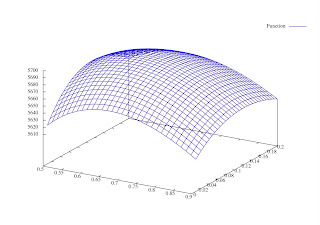
plot3d(lambda([x,y],tp(x,y)),[x,0.5,0.9],[y,0.01,0.2])
)$
2007年11月19日 星期一
The derivation of EOQ with Maxima and Texmacs

2007年11月16日 星期五
Running TeXmacs with maxima 5.13.0 under Macbook
教學相長

我是戴忠淵,目前在某科技大學任教。我的專長是作業研究(Operational Research)。那什麼是作業研究,看看英國作業研究學會的定義
Operational Research ("OR"), also known as Operations Research or Management Science ("OR/MS") looks at an organisation's operations and uses mathematical or computer models, or other analytical approaches, to find better ways of doing them.
只是我常常被誤以為是統計專長,教書八年來,沒有開過作業研究相關課程,也沒收過任何研究生。目前我上的課程名稱是資訊應用。介紹Excel如何操作使用。
2007年11月15日 星期四
Running wxMaxima with Maxima under Macbook

Here is the list of what we are going to install:
maxima, clisp, AquaTerm, gnuplot, wxmac28, wxmaxima
1. Download clisp from http://clisp.sourceforge.net/
./configure ; make;
sudo make install
2. Download maxima from http://maxima.sourceforge.net/
./configure ; make;
sudo make install
The maxima command is installed in /usr/local/bin.
AquaTerm is a Mac OS X grahics renderer. It allows command line applications written in ObjC, C, FORTRAN, Lisp, Perl or Python to display vector graphics, text and images using a simple API. Adapters for gnuplot, PGPLOT, and PLplot exists as well.
3. Download AquaTerm from http://aquaterm.sf.net/
./configure ; make;
sudo make install
4. Download gnuplot from http://www.gnuplot.info/
Now compile gnuplot 4.2 from source.
./configure ; make;
sudo make install
The gnuplot command is installed in /usr/local/bin.
wxMaxima is a cross platform GUI for the computer algebra system maxima based on wxWidgets.
5. Download wxmac28 from http://www.wxwidgets.org/downloads/
./configure ; make;
sudo make install
6. Download wxmaxima from http://wxmaxima.sourceforge.net/
./configure --with-wx-config=/usr/bin/wx-config --with-xml-prefix=/usr --enable-unicode-glyphs --enable-printing --enable-dnd --disable-dependency-tracking
make wxMaxima.app
mv wxMaxima.app/Contents/MacOS/wxmaxima wxMaxima.app/Contents/MacOS/wxmaxima.bin
Now, you can find wxMaxima.app in the directory and click it to start. Add the following in the file ~/.maxima/maxima-init.mac for plot2d, plot3d, draw2d and draw3d to work with AquaTerm.
gnuplot_command:sconcat("/usr/local/bin/gnuplot")$
draw_command:sconcat("/usr/local/bin/gnuplot")$
set_plot_option([gnuplot_term, aqua])$
set_plot_option([gnuplot_pipes_term, aqua])$
Enjoy!
2007年11月12日 星期一
讓CJK產生的PDF bookmarks不會有亂碼
首先下載 lambda-example2.zip ,將檔案解壓縮到 $TeXHome/dvipdfm/CMap目錄下,如果沒有目錄,請自行建造。以我為例,我放在$home/Library/texmf/dvipdfm/CMap。最後在\usepackage[dvipdfm]{hyperref}下加上一行
\AtBeginDvi{\special{pdf:tounicode UTF8-UCS2}}
如此就可產生的PDF就會有正常的中文bookmarks了。如果你使用XP中的MikTeX系統的話,將檔案解壓縮到C:\Program Files\MiKTeX 2.6\dvipdfm\CMap,Miktex執行更新後,就沒問題。

以下是我個人的設定
% PDF文件属性設定
\usepackage[T1]{fontenc}
\usepackage[dvipdfm, CJKbookmarks, bookmarksnumbered=true]{hyperref}
\hypersetup{pdfauthor={戴忠淵},
pdftitle={EMBA統計分析},
pdfsubject={統計分析},
pdfkeywords={CJK,LaTeX,統計分析},
pdfstartview=FitH,
pdfpagemode=UseOutlines,
bookmarks=true,
colorlinks=true,
linkcolor=blue,
citecolor=red
}
%讓中文書籤不會亂碼
\AtBeginDvi{\special{pdf:tounicode UTF8-UCS2}}
2007年11月9日 星期五
因素分析主因子萃取法求解
- 主成分法
- 主因子法(SPSS翻成主軸法)
- 最大概似法

我已經寫好巨集,Ctrl+M可以一次求解:Ctrl+N可以觀察計算過程。
2007年11月7日 星期三
Matrix Functions for EXCEL
當然,一般的數學軟體都有上述功能,但要如果只是為了這些矩陣運算而灌了一個幾百mb的軟體,也是殺雞用牛刀。在這裡,你可以到下列網址下載一個Excel的矩陣增益集
http://digilander.libero.it/foxes/matrix.zip
解開後會有一matrix的增益集檔案。Excel安裝增益集的方式為Excel功能表→增益集→瀏覽→選擇matrix.xla。如此在Excel就可使用相關的線性代數函數,相關的函數可參考壓縮檔內matrix.hlp檔。
在多變量統計中,我們較為常用的函數不外乎有
- 矩陣乘法:MProd(A, B, ...)
- 反矩陣:MInv(Mat)
- 特徵值:MEigenvalQR(Mat)
- 特徵向量:MEigenvec(A, Eigenvalues)
接著按F2(此時,會出現此一公式參照範圍),最後同時以鍵盤按ctrl+shift+enter。如此就可得到X'X如下:
以相同的方法,即可求得(X'X)^{-1}及B值。
同樣的,你也可以用MCorr(matrix),EigenvalQR(matrix)及MEigenvec(matrix,eigenvalues)來求得主成份分析中之特徵向量及主成份負荷。如下圖:
以上說明可參考該檔案,Matrix Functions for EXCEL.xls
2007年11月1日 星期四
2007年10月27日 星期六
在ubuntu 7.10 中安裝cwtex
2007年5月26日 星期六
高等統計學講義

我這幾年教這門課所準備的教材
如果你有興趣的話, 可以將下列檔案下載回去
advstat_cwtex.tar.gz
檔案內附有原始檔及pdf檔
當然你也可以自己重新編譯, 增加內容的豐富性
格式是cwtex的ctx檔
由於匆促,錯誤難免,竭誠歡迎各位提供意見與指正
2007年5月13日 星期日
在ubuntu 7.04 中安裝cwtex
Step 1. sudo apt-get install tetex-bin tetex-base tetex-extra dvipdfmx
Step 2. 下載cwtex-1.63g-linux-1.tar.bz2, cwtexmain.tgz 及 cwtexbin.tgz
- wget ftp://cle.linux.org.tw/pub/tex/cwtex/cwtex-1.63g-linux-1.tar.bz2
- wget ftp://ftp.ntu.edu.tw/cwtex/cwTeX-Linux/cwtexmain.tgz
- wget ftp://ftp.ntu.edu.tw/cwtex/cwTeX-Linux/cwtexbin.tgz
Step 3. 安裝cwtex
- 將cwtex-1.63g-linux-1.tar.bz2解開, 並複製到/usr/share/texmf
- 將cwtexmain.tgz解開, 並複製到/usr/share/texmf-tetex
- 將cwtexbin.tgz解開, 並複製到/usr/bin
Step 4. 修改/usr/share/texmf-tetex/dvips/config/config.ps, 加上一行 p +cwfont.map
Step 5. sudo texhash
Step 6. sudo updmap --enable Map cwtex.map
如此不僅能在ubuntu中使用cwTeX, Kdvi的中文顯示也不會有亂碼!